Admin

Ansible and AWS ASG, a (really) dynamic inventory

I found myself searching ridiculously too long to achieve what I believed was a simple task: to apply an Ansible role to newly created instances… started by an Auto Scaling Group. If you’re used to Ansible you know that it relies on an inventory to apply a playbook, but obviously, when you’re firing up EC2 instances with the same playbook, you are not able to know what will be your virtual machines IP addresses, nor can ec2.py, the recommended method to deal with dynamic inventories.
Run CoreOS on FreeBSD's bhyve

No, I’m not following the hype, only I like to test things plus I feel there will be a growing demand for docker at ${DAYWORK}. I read here and there that CoreOS was the Linux distribution of choice to play with docker, so while at it, I picked up this one to dive into the container world. Finally, I’ve been willing to put my hands on bhyve for quite a while, so I took this opportunity to learn all those new (to me) technologies at once.

Migrate FreeBSD root on UFS to ZFS

At ${DAYJOB} I’m using a FreeBSD workstation for quite a while. Everything goes smoothly except for the filesystem. When I first installed it, I chose UFS because FreeBSD installer said that root-on-ZFS was “experimental”. I later learned that nobody uses UFS anymore and that root-on-ZFS is perfectly stable. Thing is, I chose UFS and I deeply regret it. Not because of ZFS’s features that absolutely do not matter for me on the desktop, but because FreeBSD implementation of UFS is terribly, terribly slow when it comes to manipulate big files. When I say slow, I mean that pkg upgrade tends to FREEZE the entire machine while extracting archives. That slow. And before you ask, yes, there’s been a lot of tuning on that side.

Letsencrypt friendly nginx configuration

So I use this great cheat sheet in order to use letsencrypt free Certificate authority on my own servers, but while this small doc is very straightforward it doesn’t explain much about nginx’s configuration. So I’ll drop my own right here so your journey through TLS is even simpler:

$ cat /usr/pkg/etc/nginx/nginx.conf

# this nginx installation comes from pkgsrc for both Linux and NetBSD
# you might have to adapt paths to suit your needs... or switch to pkgsrc ;)

user   nginx  nginx;
worker_processes  2;

events {
    worker_connections  1024;
}

http {
    include       /usr/pkg/etc/nginx/mime.types;
    default_type  application/octet-stream;

    sendfile        on;
    keepalive_timeout  65;

    # a little bit of browser leverage doesn't hurt :)
    gzip  on;
    gzip_vary on;
    gzip_types text/plain text/css application/json application/x-javascript text/xml application/xml application/xml+rss text/javascript application/javascript;
    gzip_proxied any;

    server {
        # serve boths IPv4 and IPv6 FWIW
        listen       [::]:80;
        listen       80;

        server_name  localhost example.com *.example.com;

        # this is where letsencrypt will drop the callenge
        location /.well-known/acme-challenge {
                default_type "text/plain";
                root /var/www/letsencrypt;
        }

        # redirect everything else to HTTPS
        location / { return 302 https://$host$request_uri; }
    }

    server {
        listen       [::]:443 ssl;
        listen       443 ssl;

        # you'll have to declare those domains accordingly in letsencrypt conf
        server_name  localhost example.com *.example.com;

        # here lies letsencrypt PEM files
        ssl_certificate      /etc/letsencrypt/live/example.com/fullchain.pem;
        ssl_certificate_key  /etc/letsencrypt/live/example.com/privkey.pem;

        # harden used protocols a little
        ssl_protocols TLSv1 TLSv1.1 TLSv1.2;
        ssl_session_cache    shared:SSL:1m;
        ssl_session_timeout  5m;
        ssl_ciphers 'EECDH+AESGCM:EDH+AESGCM:AES256+EECDH:AES256+EDH';
        ssl_prefer_server_ciphers  on;

        # and then include actual locations
        include sites/*;
    }
}

A very basic proxy_pass location would be:

5 minutes collectd + facette setup

I recently added a fantastic graphing tool named facette to pkgsrc. Facette knows how to pull data sources from various backends, and among them, the famous collectd.

In this article, we will see how to setup both on NetBSD but keep in mind it should also work for any platform supported by pkgsrc.

First up, collectd installation. It can be done either with pkgin (binary installation) or pkgsrc (source installation):

  • with pkgin
$ sudo pkgin in collectd collectd-rrdtool
  • with pkgsrc
 $ cd /usr/pkgsrc/sysutils/collectd
 $ sudo make install clean
 $ cd ../collectd-rrdtool
 $ sudo make install clean

Tune up a minimal collectd configuration

Simpler postfix + dspam

I have read a shitload of overcomplicated setups to bring up a postfix / dspam SMTP + antispam server, and finally came to a much lighter and simpler configuration by basically reading documentation and real life examples. Note this is suitable for a personnal and basic environment, no database, no virtual setup. Basic stuff.

The target system is NetBSD but this short doc should apply to pretty much any UNIX / Linux.

Start pkgsrc's nginx with systemd

Not so long ago, I wrote about using pkgsrc on Debian GNU/Linux, and assumed you’d start an installed service using rc.d. When I setup the new iMil.net server, I decided to give a try to kvm as it is easier to maintain, has good performances (sometimes better than Xen), nice administration tools, plus NetBSD now has a good VirtIO driver but no PVHVM support yet.

The first thing I do when setting up a Debian Jessie server is getting rid of systemd, whose philosophy and quality don’t match my personnal taste; but in that case, I wanted to use libvirtd so I could manage my virtual machines with virt-manager, and as a matter of fact, libvirtd has a hard dependency on systemd. There was no escape this time, I had to learn and use it.

NetBSD/amd64 7.0 on kvm

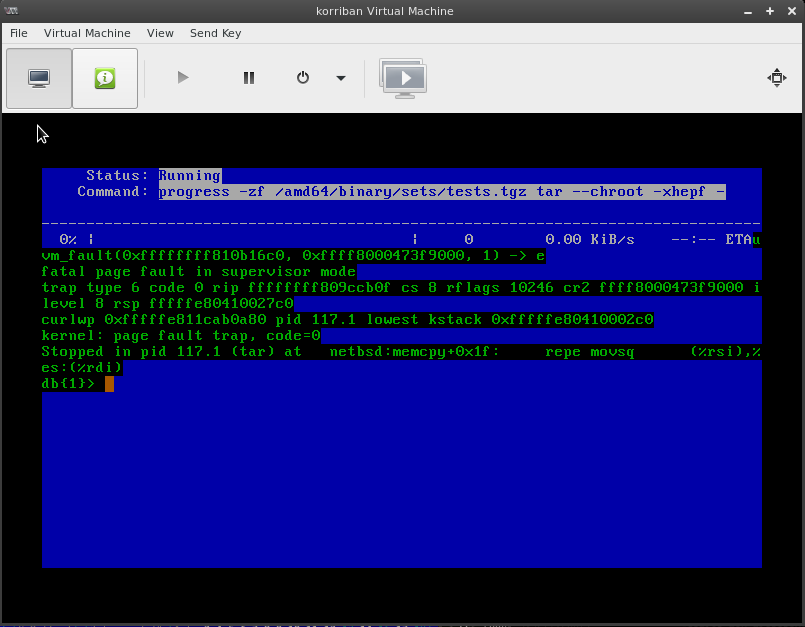
If you recently tried to install NetBSD 7.0 using Linux KVM you might have encountered the following failure:

This bug have been recently fixed on the 7-branch but the official ISO images are not yet updated, so you’ll have to use NetBSD daily builds mini-ISO which includes Christos fix to bus_dma.c

For the record, here’s the virt-install command I use:

sudo virt-install
    --virt-type kvm
    --name korriban
    --ram 4096 --disk path=/dev/vms/korriban,bus=virtio
    --vcpus 2
    --network bridge:br0,model=virtio
    --graphics vnc
    --accelerate
    --noautoconsole
    --cdrom /home/imil/iso/boot.iso
    --cpu host

Performances are really good, the host is a Debian GNU/Linux 8.0 amd64 running on Online’s Dedibox Classic 2015.

t'es trop VIP

waiii alors j’entend d’ici “haooon iMil il a cedé aux sirènes du web deux-zero toussaaaa, vla qu’il fait dla CSS et du PHP”. Bon ok ouais chu un peu tombé dans le hype-fashion, mais avouez, le ptit “Tags cloud” là, c’est pas convivial tout plein ? Pour réaliser cette petite mignonnerie, j’ai été piocher ici, et pour réparer l’import de categories-toutes pas-fashion en Tags, il faut suivre ce que dit le monsieur ici. Le cas échéant, on se mange un joli :

you must unLEaaarn what ou have leaaarned

alors voila, pardon. Y’a -fiou- 2 ans, je bavais comme un vilain sur dspam, et là, là, eh bah je m’incline. In-cro-yable efficacité, je lui ai fait bouffer un millier de hams, un millier de spams, et pouf, le vla-t-y pas qu’il me catche un bon 96% de saloperies. Alors attention, c’est sur mon kimloli, c’est du perso, c’est pas mutualisé pour deux sous. Mais intégration à sendmail les doigts dans le nez (+ procmail):